教程:数据记录器#3 – 测量/图表/日志当前的树莓派
教程:数据记录器#3 – 测量/图表/日志当前的树莓派
软件
 由于目前在许多我们的SwitchDoc实验室的设计如此重要,我们决定建立一个基于树莓派数据记录器读了多少电流进入Arduino的基于发射器和使用这些信息来修改系统,以降低电流。本教程演示如何构建数据记录器。
数据记录仪包括运行数据记录Python软件,MySQL和MatPlotLib和Apache网络服务器一个树莓派3。本教程的这部分显示了如何安装的所有软件和有关DataLogger.py软件会谈。由于我们目前测量电流,我们使用的是 格罗夫INA3221 3通道电流/电压测量装置。
树莓丕软件安装
我们将需要安装以下三个主要的软件包。MySQL的/ phpMyAdmin的/ Apache Web服务器,apscheduler,MatPlotLib然后将数据记录的Python软件本身。
MySQL的/ phpMyAdmin的/阿帕奇
MySQL的是用来存储从数据记录器的软件的数据,以提供可用于以后的分析和绘图的数据库。phpMyAdmin的软件用于设置和控制MySQL数据库服务器,最后Apache是用来服务phpMyAdmin的网页和数据记录器的图形。
安装MySQL / phpMyAdmin的/阿帕奇-使用下面的优秀教程: http://pimylifeup.com/raspberry-pi-mysql-phpmyadmin/
Apscheduler
apscheduler是用于从在不同的线程中运行的主Python程序内安排活动很好Python包。大约在另一个线程运行的任务像这样的好事,就是挂起的一个线程不会停止整个系统。只是,线程。
sudo pip install setuptools --upgrade
sudo pip install apscheduler
MatPlotLib
MatPlotLib是制作使用类似于MATLIB对树莓派方法出版质量的情节一个Python库。您可以输出的格式,如PDF,后记,SVG和PNG。
安装以下软件包(这将需要相当长的时间)
$ sudo apt-get install libblas-dev        ## 1-2 minutes
$ sudo apt-get install liblapack-dev      ## 1-2 minutes
$ sudo apt-get install python-dev        ## Optional
$ sudo apt-get install libatlas-base-dev ## Optional speed up execution
$ sudo apt-get install gfortran           ## 2-3 minutes
$ sudo apt-get install python-setuptools  ## ?
$ sudo easy_install scipy                 ## 2-3 hours

$ sudo apt-get install python-matplotlib  ## 1 hour
数据记录器Python软件
要安装数据记录器软件,执行以下操作:
cd
git clone https://github.com/switchdoclabs/SDL_Pi_DataLogger.git
现在,你已经安装了所有必需的软件。
最后两件事情:
- 打开phpMyAdmin的,去到SQL标签和DataLogger.sql的内容复制到MySQL的框,然后点击“进入”,以建立数据库。
- 复制DataLogger.html到/ var / www / html等:
sudo cp DataLogger.html /var/www/html
现在,你准备好了。
数据记录器的主要软件模块
还有在数据记录器软件三大软件模块而承受一些解释。
调度软件
以下是如何定义往往是调度代码运行的常量。
#如何往往在几秒钟内样本数据
SampleTime = 0.5
#如何长秒的样本数据
LengthSample = 60000
常#如何生成秒图表
GraphRefresh = 10
#如何许多样品图
GraphSampleCount = 300
调度代码开始四个不同的工作,在单独的线程中运行。
- READDATA – 读取INA3221并存储在MySQL的数据
- buildGraph – 在构建MatPlotLib图,并将其复制到/ var / www / html等
- killLogger – 的很长一段时间后杀死了记录软件
- 嘀 – 打印出当前时间
    scheduler = BackgroundScheduler()
    scheduler.add_job(readData, 'interval', seconds=SampleTime)
    scheduler.add_job(buildGraph, 'interval', seconds=GraphRefresh)
    scheduler.add_job(killLogger, 'interval', seconds=LengthSample)
    scheduler.add_job(tick, 'interval', seconds=60)
    scheduler.start()
    scheduler.print_jobs()
该INA3221采样软件
调度调用数据采集软件的每个“SampleTime”0.5秒在上面的例子中。该INA3221被读取,然后将数据写入到MySQL数据库。
def readData():
    	print('readData - The time is: %s' % datetime.now())


  	print "------------------------------"
  	shuntvoltage1 = 0
  	busvoltage1   = 0
  	current_mA1   = 0
  	loadvoltage1  = 0


  	busvoltage1 = ina3221.getBusVoltage_V(LIPO_BATTERY_CHANNEL)
  	shuntvoltage1 = ina3221.getShuntVoltage_mV(LIPO_BATTERY_CHANNEL)
  	# minus is to get the "sense" right.   - means the battery is charging, + that it is discharging
  	current_mA1 = ina3221.getCurrent_mA(LIPO_BATTERY_CHANNEL)

  	loadvoltage1 = busvoltage1 + (shuntvoltage1 / 1000)

        # set Label
	# myLabel = "LIPO_Battery"
        myLabel = ""

  	print "(Channel 1) %s Bus Voltage 1: %3.2f V " % (myLabel, busvoltage1)
  	print "(Channel 1) %s Shunt Voltage 1: %3.2f mV " % (myLabel, shuntvoltage1)
  	print "(Channel 1) %s Load Voltage 1:  %3.2f V" % (myLabel, loadvoltage1)
  	print "(Channel 1) %s Current 1:  %3.2f mA" % (myLabel, current_mA1)
  	print

  	shuntvoltage2 = 0
  	busvoltage2 = 0
  	current_mA2 = 0
  	loadvoltage2 = 0

  	busvoltage2 = ina3221.getBusVoltage_V(SOLAR_CELL_CHANNEL)
  	shuntvoltage2 = ina3221.getShuntVoltage_mV(SOLAR_CELL_CHANNEL)
        # "-" removed for this demo program
  	current_mA2 = ina3221.getCurrent_mA(SOLAR_CELL_CHANNEL)
  	loadvoltage2 = busvoltage2 + (shuntvoltage2 / 1000)

        # set Label
	# myLabel = "Solar Cell"
        myLabel = ""

  	print "(Channel 2) %s Bus Voltage 2:  %3.2f V " % (myLabel, busvoltage2)
  	print "(Channel 2) %s Shunt Voltage 2: %3.2f mV " % (myLabel, shuntvoltage2)
  	print "(Channel 2) %s Load Voltage 2:  %3.2f V" % (myLabel, loadvoltage2)
  	print "(Channel 2) %s Current 2:  %3.2f mA" % (myLabel, current_mA2)
  	print

  	shuntvoltage3 = 0
  	busvoltage3 = 0
  	current_mA3 = 0
  	loadvoltage3 = 0

  	busvoltage3 = ina3221.getBusVoltage_V(OUTPUT_CHANNEL)
  	shuntvoltage3 = ina3221.getShuntVoltage_mV(OUTPUT_CHANNEL)
  	current_mA3 = ina3221.getCurrent_mA(OUTPUT_CHANNEL)
  	loadvoltage3 = busvoltage3 + (shuntvoltage3 / 1000)

	# set Label
	# myLabel = "Output"
        myLabel = ""

  	print "(Channel 3) %s Bus Voltage 3:  %3.2f V " % (myLabel, busvoltage3)
  	print "(Channel 3) %s Shunt Voltage 3: %3.2f mV " % (myLabel, shuntvoltage3)
  	print "(Channel 3) %s Load Voltage 3:  %3.2f V" % (myLabel, loadvoltage3)
  	print "(Channel 3) %s Current 3:  %3.2f mA" % (myLabel, current_mA3)
  	print
	#
	# Now put the data in MySQL
	#
        # Put record in MySQL

        print "writing SQLdata ";


        # write record
        deviceid = 0
        query = 'INSERT INTO '+tableName+('(timestamp, deviceid, channel1_load_voltage, channel1_current, channel2_load_voltage, channel2_current, channel3_load_voltage, channel3_current) VALUES(UTC_TIMESTAMP(),  %i,  %.3f, %.3f, %.3f, %.3f, %.3f, %.3f)' %( deviceid,  busvoltage1, current_mA1, busvoltage2, current_mA2, busvoltage3, current_mA3))
        print("query=%s" % query)

        cur.execute(query)
	con.commit()
<\pre>

   不要忘了con.commit()结尾。否则,您的数据将神秘消失,因为READDATA()从主程序一个单独的线程运行。
该MatPlotLib图表软件
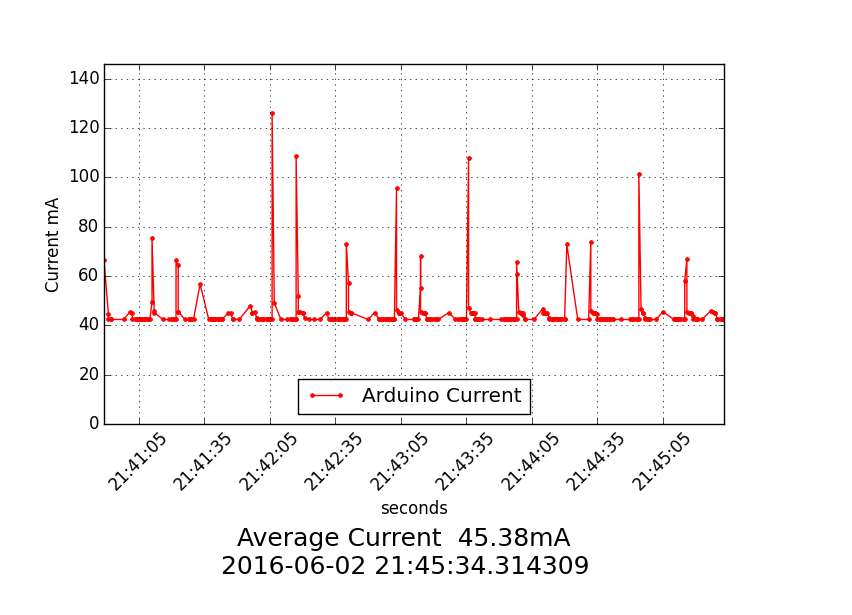
当由上述(在我们的示例代码,每10秒),调度程序调用,该图是从最后重建。这使得HTML页面来获得一个新的图的每个时间间隔。该图是由“GraphSampleCount”,300个样本在我们的例子中产生。
def buildGraph():
    		print('buildGraph - The time is: %s' % datetime.now())

		# open database
		con1 = mdb.connect('localhost', 'root', password, 'DataLogger' )
		# now we have to get the data, stuff it in the graph

    		cursor = con1.cursor()

		query = '(SELECT timestamp, deviceid, channel1_load_voltage, channel1_current, channel2_load_voltage, channel2_current, channel3_load_voltage, channel3_current, id FROM '+tableName+' ORDER BY id DESC LIMIT '+ str(GraphSampleCount) + ') ORDER BY id ASC'

		print "query=", query
		try:
			cursor.execute(query)
			result = cursor.fetchall()
		except:
			e=sys.exc_info()[0]
			print "Error: %s" % e


		print result[0]
		t = []   # time
		u = []   # channel 1 - Current
		averageCurrent = 0.0
 		currentCount = 0
		for record in result:
			t.append(record[0])
			u.append(record[7])
			averageCurrent = averageCurrent+record[7]
			currentCount=currentCount+1

		averageCurrent = averageCurrent/currentCount

		print ("count of t=",len(t))

		fds = dates.date2num(t) # converted
		# matplotlib date format object
		hfmt = dates.DateFormatter('%H:%M:%S')
		#hfmt = dates.DateFormatter('%m/%d-%H')

		fig = pyplot.figure()
		fig.set_facecolor('white')
		ax = fig.add_subplot(111,axisbg = 'white')
		ax.vlines(fds, -200.0, 1000.0,colors='w')


		#ax.xaxis.set_major_locator(dates.MinuteLocator(interval=1))
		ax.xaxis.set_major_formatter(hfmt)
		ax.set_ylim(bottom = -200.0)
		pyplot.xticks(rotation='45')
		pyplot.subplots_adjust(bottom=.3)
		pylab.plot(t, u, color='r',label="Arduino Current",linestyle="-",marker=".")
		pylab.xlabel("Seconds")
		pylab.ylabel("Current mA")
		pylab.legend(loc='lower center')

		pylab.axis([min(t), max(t), 0, max(u)+20])
		pylab.figtext(.5, .05, ("Average Current %6.2fmA\n%s") %(averageCurrent, datetime.now()),fontsize=18,ha='center')

		pylab.grid(True)

		pyplot.show()
		pyplot.savefig("/var/www/html/DataLoggerGraph.png", facecolor=fig.get_facecolor())


		cursor.close()
		con1.close()

		fig.clf()
		pyplot.close()
		pylab.close()
		gc.collect()
		print "------Graph finished now"
当您使用此代码播放,请确保您在matplotlib.org网站每个命令查找,所以你知道你在做什么。这是一个有点神秘,至少可以说。
示例执行和结果
pi@RPi3:~/SDL_Pi_DataLogger $ sudo python DataLogger.py

Datalogger

Sample uses 0x40 and SunAirPlus board INA3221
 Will work with the INA3221 SwitchDoc Labs Breakout Board
Program Started at:2016-06-07 00:56:41

Jobstore default:
    readData (trigger: interval[0:00:00.500000], next run at: 2016-06-07 00:56:41 UTC)
    buildGraph (trigger: interval[0:00:10], next run at: 2016-06-07 00:56:51 UTC)
    tick (trigger: interval[0:01:00], next run at: 2016-06-07 00:57:41 UTC)
    killLogger (trigger: interval[16:40:00], next run at: 2016-06-07 17:36:41 UTC)
Press Ctrl+C to exit
buildGraph - The time is: 2016-06-07 00:56:41.355321
query= (SELECT timestamp, deviceid, channel1_load_voltage, channel1_current, channel2_load_voltage, channel2_current, channel3_load_voltage, channel3_current, id FROM WeatherLink ORDER BY id DESC LIMIT 300) ORDER BY id ASC
(datetime.datetime(2016, 6, 4, 17, 23, 26), 0L, 4.168, -39.6, 0.672, 0.0, 5.024, 9.6, 162901L)
('count of t=', 300)
readData - The time is: 2016-06-07 00:56:41.893182
------------------------------
(Channel 1)  Bus Voltage 1: 4.14 V
(Channel 1)  Shunt Voltage 1: 1.00 mV
(Channel 1)  Load Voltage 1:  4.15 V
(Channel 1)  Current 1:  10.00 mA

(Channel 2)  Bus Voltage 2:  0.00 V
(Channel 2)  Shunt Voltage 2: 0.00 mV
(Channel 2)  Load Voltage 2:  0.00 V
(Channel 2)  Current 2:  0.00 mA

(Channel 3)  Bus Voltage 3:  0.00 V
(Channel 3)  Shunt Voltage 3: 0.00 mV
(Channel 3)  Load Voltage 3:  0.00 V
(Channel 3)  Current 3:  0.00 mA

writing SQLdata
query=INSERT INTO WeatherLink(timestamp, deviceid, channel1_load_voltage, channel1_current, channel2_load_voltage, channel2_current, channel3_load_voltage, channel3_current) VALUES(UTC_TIMESTAMP(),  0,  4.144, 10.000, 0.000, 0.000, 0.000, 0.000)
readData - The time is: 2016-06-07 00:56:42.409886
------------------------------
(Channel 1)  Bus Voltage 1: 4.02 V
(Channel 1)  Shunt Voltage 1: 1.00 mV
(Channel 1)  Load Voltage 1:  4.03 V
(Channel 1)  Current 1:  10.00 mA

(Channel 2)  Bus Voltage 2:  0.00 V
(Channel 2)  Shunt Voltage 2: 0.00 mV
(Channel 2)  Load Voltage 2:  0.00 V
(Channel 2)  Current 2:  0.00 mA

(Channel 3)  Bus Voltage 3:  0.00 V
(Channel 3)  Shunt Voltage 3: 0.00 mV
(Channel 3)  Load Voltage 3:  0.00 V
(Channel 3)  Current 3:  0.00 mA

writing SQLdata
query=INSERT INTO WeatherLink(timestamp, deviceid, channel1_load_voltage, channel1_current, channel2_load_voltage, channel2_current, channel3_load_voltage, channel3_current) VALUES(UTC_TIMESTAMP(),  0,  4.024, 10.000, 0.000, 0.000, 0.000, 0.000)
No handlers could be found for logger "apscheduler.scheduler"
------Graph finished now
readData - The time is: 2016-06-07 00:56:43.349699
------------------------------
(Channel 1)  Bus Voltage 1: 3.82 V
(Channel 1)  Shunt Voltage 1: 1.00 mV
(Channel 1)  Load Voltage 1:  3.83 V
(Channel 1)  Current 1:  10.00 mA

(Channel 2)  Bus Voltage 2:  0.00 V
(Channel 2)  Shunt Voltage 2: 0.00 mV
(Channel 2)  Load Voltage 2:  0.00 V
(Channel 2)  Current 2:  0.00 mA

(Channel 3)  Bus Voltage 3:  0.00 V
(Channel 3)  Shunt Voltage 3: 0.00 mV
(Channel 3)  Load Voltage 3:  0.00 V
(Channel 3)  Current 3:  0.00 mA

writing SQLdata
query=INSERT INTO WeatherLink(timestamp, deviceid, channel1_load_voltage, channel1_current, channel2_load_voltage, channel2_current, channel3_load_voltage, channel3_current) VALUES(UTC_TIMESTAMP(),  0,  3.824, 10.000, 0.000, 0.000, 0.000, 0.000)
readData - The time is: 2016-06-07 00:56:44.349705
------------------------------
这显示在连接的电流和电压的设备到通道1被测(DUT)。
这里是从所得的网页的示例曲线图。

Arduino UNO,然后Arduino Pro Mini 测试运行
结论
树莓丕数据记录器允许我们测量许多不同类型的变量,并使用相同的基本代码,并写入到用于进一步分析的数据库。使用自动刷新HTML页面可以让我们看到的数据,因为它不发生系统和网络过载很大。而且你可以很容易地修改HTML代码以及Python的数据记录代码。
使用Google自动编译自:http://www.switchdoc.com/2016/06/tutorial-datalogger-3-measuregraphlog-current-raspberry-pi/